 wxtxt
wxtxt
Marine Forecasts on Your Garmin inReach
wxtxt works over satellite messengers, not just cell service — sign up with your Garmin inReach's number and the same official marine forecast lands in its message thread, wherever you are.
-
Find your inReach's phone number
Garmin assigns every inReach a regular-looking phone number (an MDN) for two-way messaging. Find yours in the Garmin Messenger or Garmin Explore app under your device's profile, or on your account at explore.garmin.com.
-
Start sign up with that number
Go to wxtxt.ca, enter the inReach's number, and pick your forecast area as normal.
-
If wxtxt can't send the login code to the Garmin, you'll get a message on the login code screen with instructions
Garmin's satellite network only accepts an inbound text from a number your inReach has already texted first — that's how it opens a two-way channel, not something wxtxt controls. So your first verification code may not get through on its own. See Garmin's own Sending a Message to an inReach Device for how this works on their end.
Follow the on-screen instructions: from the inReach device itself (not a paired phone), send the number shown a short message likeOK. wxtxt will automatically resend your code once it sees the channel open.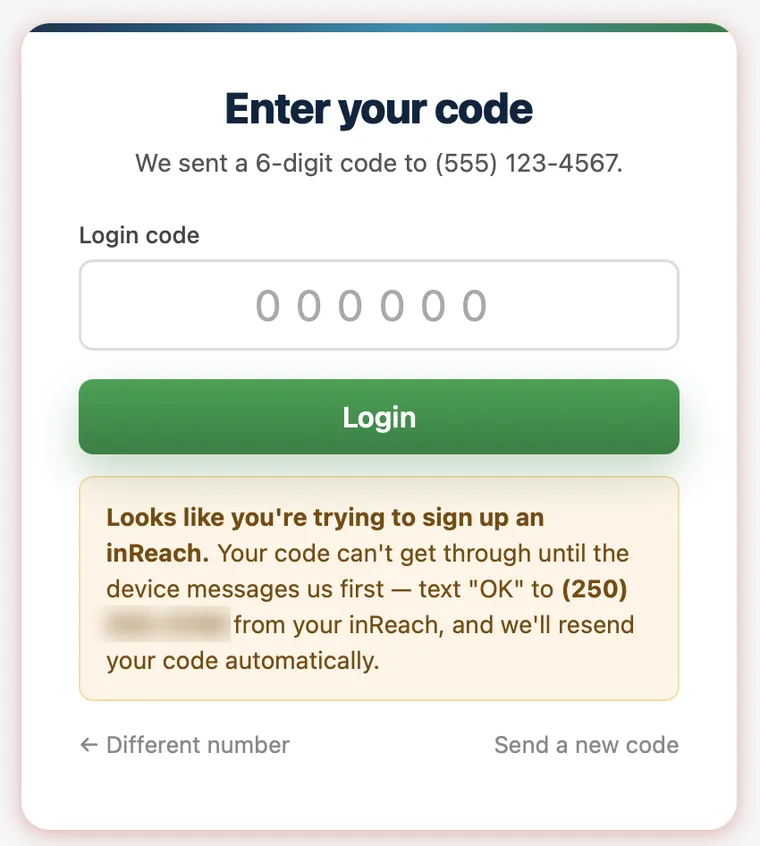
-
Wait for your code
Once wxtxt sees the inReach open the channel, it automatically resends the same verification code. Satellite messages are slower than cellular SMS — allow a few minutes and check the inReach for the incoming text.
-
Enter the code and finish signing up
Type the code from the inReach into the browser tab where you started. You're subscribed — forecasts now arrive as regular messages in that same thread.
Good to know
Every forecast text counts against your Garmin messaging plan the same as any other message, so keep an eye on your plan's quota. Garmin's own device software splits long messages into multiple parts automatically — that's normal, not a wxtxt error.
All the regular SMS commands work the same way over an inReach — reply FEEDOFF / FEEDON to pause or resume, AREA <place> to switch forecast areas, or HELP for the full list.
Using a ZOLEO® or another two-way satellite messenger? The same "device must message us first" rule generally applies, but wxtxt's automatic code-resend is currently built specifically for the Garmin inReach bounce message. If your code doesn't arrive, texting your wxtxt number from the device first is the reliable fix regardless of hardware.
Still stuck?
Email us at and we'll help sort it out.
← Back